






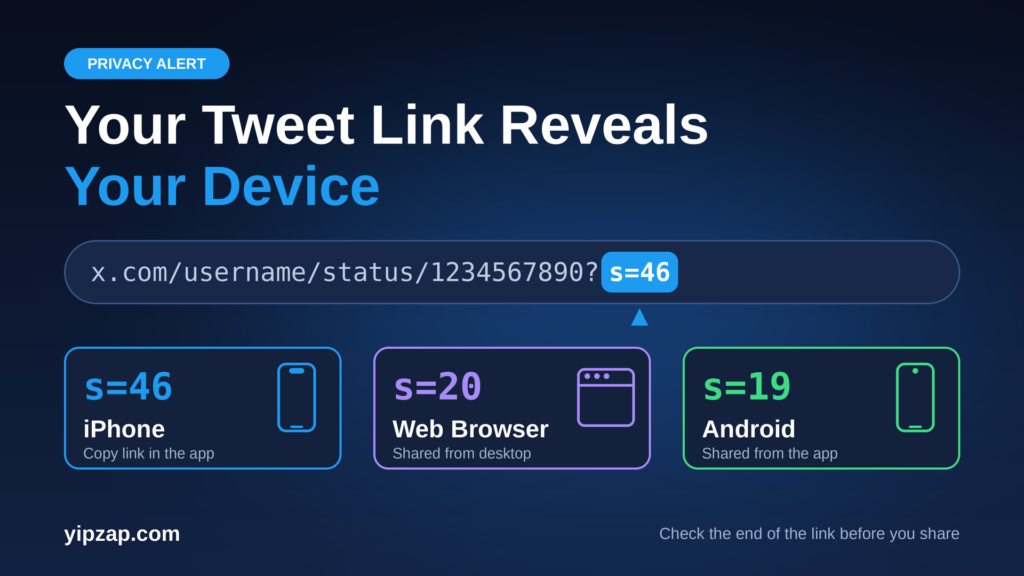
Look at the end of a tweet link, and you may see a small code like ?s=46. That code is not random. Each number points to the app or device where someone copied the link. Internet users now use this Twitter link s=46 trick to guess if a person shared a post from an iPhone, an Android phone, or a web browser.
What Do s=46, s=20 and s=19 Mean?
When you tap “Copy link” on a post, X adds a short tag to the end of the web address. The tag starts with s= and then shows a number. People who study these links have matched the numbers to devices over several years.
| Code at the end | What it usually means |
|---|---|
s=46 | Link copied with the “Copy link” button in the X app on an iPhone |
s=20 | Link shared from the web, such as a desktop or laptop browser |
s=19 | Link shared from the X app on an Android phone |
So if you see a link that ends with s=46, the person most likely used an iPhone. A link that ends with s=20 most likely came from a browser. A link that ends with s=19 most likely came from an Android phone.
More Codes Show How People Shared the Post
The system goes deeper than three numbers. Researchers who decoded the tags found that many values also show the way someone shared the post. For example, one number points to an iPhone user who shared by text message, and another points to an iPhone user who shared by email. More numbers cover apps like WhatsApp, Telegram and Snapchat, and a separate range of numbers covers iPads. You can read the community notes in this detailed research thread.
Important: X has never published an official list of these codes, as far as we could find. The meanings above come from users who tested links on many devices. They work well in practice, but treat them as strong clues, not proof.
What Can Someone Really Learn From Your Link?
This trick sounds scary, but it has clear limits. A tag like s=46 tells you the type of device that copied the link. It does not tell you the exact phone model, the phone number, the home address or the location of the person.
The tag also describes only the person who shared the link. It says nothing about the person who clicks on it later. And anyone can edit a link by hand, so a changed or cleaned link can hide the original device.
Still, the tag can help in real situations. Reporters and fact-checkers use it as one small clue when they check who posted a screenshot or a link. A group of posts that all share the same tags can also hint at a coordinated campaign.
What Is the t= Code in Tweet Links?
Many shared links carry a second code that starts with t=. This one is a long string of random-looking letters and numbers. Reports about it do not fully agree. Some users say it changes with each login session. Some engineers say it can link to the account that shared the link, which would let the platform see who opened that link. X has not given a public, detailed explanation that we could find.
Because of that doubt, privacy experts give simple advice: do not share the long version of any link if you can avoid it. Newer links can even carry extra codes, such as a=, on top of s=.
How to Remove the Tracking Code From a Tweet Link
The good news is that the clean link works exactly the same. Everything after the question mark is extra, and the post opens without it.
https://x.com/username/status/1234567890123456789
- Copy the link of the post as you normally do.
- Paste it into the message box or the address bar.
- Find the question mark
?in the link. - Delete the question mark and everything after it.
- Send the short link.
This takes five seconds, and it removes both the device clue and the session code. Many link cleaner tools and browser extensions also do this for you automatically.
Why This Story Matters
Most people never read the end of a link, yet every link tells a small story. The Twitter link s=46 trick shows how a tiny piece of text can reveal the device and the sharing method behind a post. It does not break any security, and it does not expose your identity on its own. But it reminds us that big platforms add tracking details to the links we share, often without a clear warning.
The takeaway is simple. Check the end of a link before you share it, and cut off the extra code. You protect your own privacy, and you protect the privacy of your friends too.